Television has changed significantly with the growth of internet-based streaming. Instead of relying only on traditional cable, satellite, or terrestrial broadcasts, viewers can now access television and video content through internet-connected devices.
But what is IPTV, and how does it actually work?
IPTV stands for Internet Protocol Television. It refers to the delivery of television and video content through an IP-based network rather than through traditional broadcast methods.
In this guide, we'll explain what IPTV is, how IPTV works, the different types of IPTV, how to set up IPTV, which IPTV devices can be used, what you need for IPTV streaming, and how to choose a suitable service.
What Is IPTV?
IPTV stands for Internet Protocol Television.
In simple terms, IPTV is a method of delivering television and video content over an internet protocol network.
Traditional television may use cable infrastructure, satellite signals, or terrestrial broadcasting. IPTV uses an IP network to deliver video content to a compatible device.
Depending on the service, IPTV can support different types of viewing, including:
- Live television
- Video on demand
- Time-shifted programming
- Catch-up content
- Other internet-delivered video
One important distinction is that IPTV is a delivery technology, not automatically a specific type of content or a particular provider.
Different IPTV services can offer different content, applications, devices, features, pricing, and availability.
How Does IPTV Work?
Understanding how IPTV works is easier when you look at the process from beginning to end.
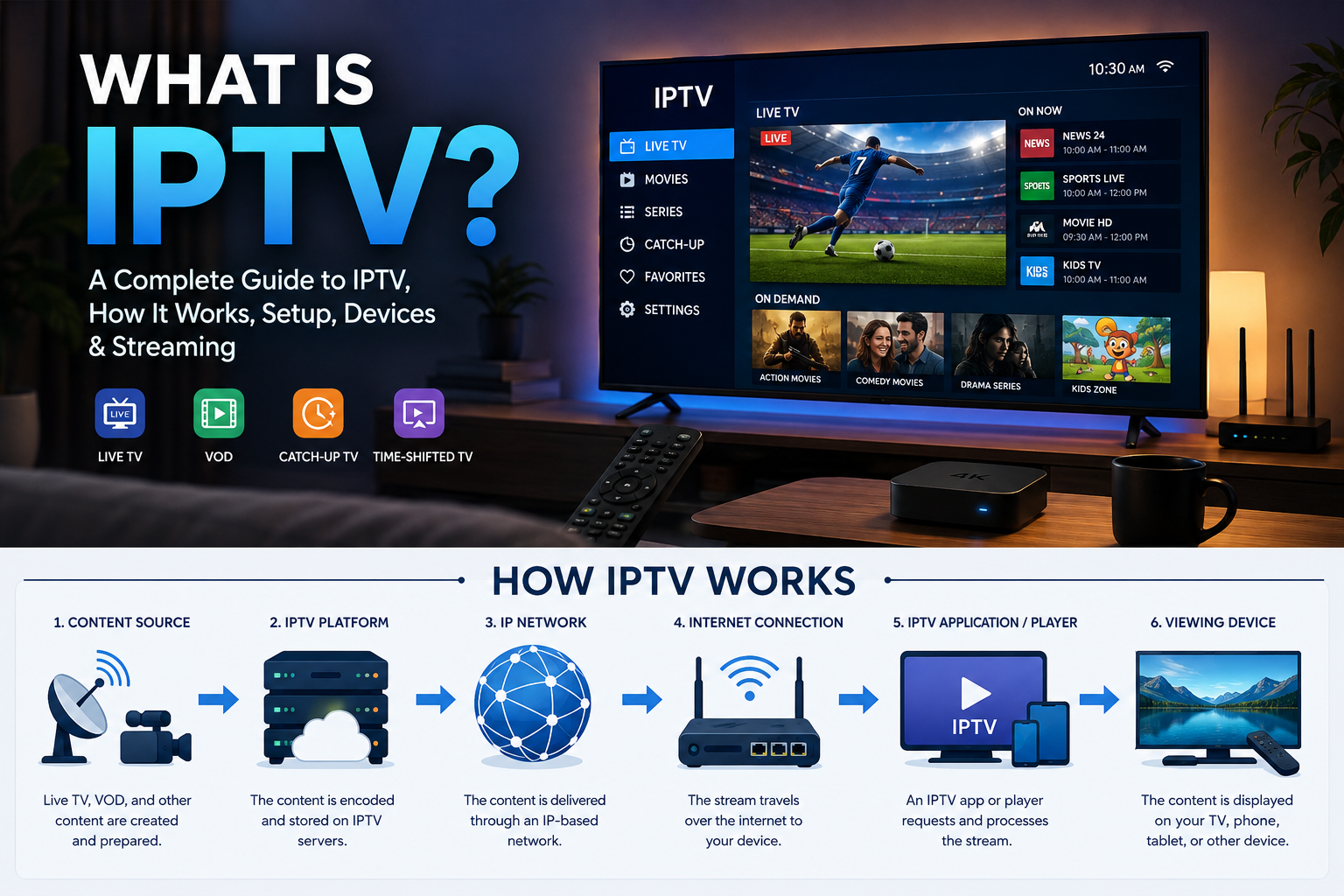
A simplified IPTV delivery process looks like this:
Content source → IPTV platform → IP network → Internet connection → IPTV application/player → Viewing device
Here's what happens at each stage.
1. Video Content Is Prepared for Delivery
Content must first be processed into a format suitable for internet transmission.
This can include live television programming, video-on-demand content, or other video.
2. Content Is Delivered Through an IP Network
The video is transmitted using Internet Protocol networks.
Instead of receiving a traditional broadcast signal directly from a satellite or terrestrial transmitter, the compatible device receives the content through its network connection.
3. Your Device Requests the Content
When you select a channel or video, the IPTV application communicates with the relevant service and requests the selected stream.
4. The Stream Is Delivered to Your Device
The requested video data travels through the internet connection to your device.
5. The IPTV Application Plays the Stream
An IPTV-compatible application or player processes the incoming data and displays the video on your screen.
This is why IPTV app setup and device compatibility can be important.
What Are the Types of IPTV?
IPTV can support several different ways of watching television and video content.
Live TV
Live IPTV allows viewers to watch programming as it is being broadcast or streamed.
This is similar to traditional live television, except the content is delivered through an IP network.
Video on Demand (VOD)
Video on Demand allows viewers to select a specific video from an available library and watch it when they choose.
Time-Shifted TV
Time-shifted television allows viewers to watch certain programming at a later time instead of watching it at its original broadcast time.
Catch-Up TV
Some services provide catch-up functionality that allows viewers to watch recently aired programs for a limited period.
Availability depends on the service and the content rights associated with it.
What Do You Need to Watch IPTV?
If you're wondering how to start watching IPTV, there are several basic requirements.
A Reliable Internet Connection
Because IPTV uses an IP network, your internet connection plays an important role in the streaming experience.
A stable connection is particularly important when watching higher-resolution video.
A Compatible Device
You need a device that supports the IPTV service or application you're using.
Examples can include:
- Smart TVs
- Android TV devices
- Google TV devices
- Fire TV devices
- Smartphones
- Tablets
- Computers
- Compatible streaming hardware
An IPTV Application or Player
Many IPTV services require a compatible application or player.
The exact application and setup process can vary depending on the device and service.
Access Information
Depending on the service, you may need an account, username and password, playlist information, an activation code, or another form of authentication.
How to Set Up IPTV
If you're searching for how to set up IPTV, the exact steps depend on your device, application, and service.
However, the general setup process is straightforward.
IPTV Setup Guide
Step 1: Connect Your Device to the Internet
Connect your Smart TV, streaming device, smartphone, tablet, or computer to a reliable internet connection.
If you're using Wi-Fi, try to keep the device within a reasonable range of your router.
Step 2: Choose a Compatible IPTV Application
Find an IPTV application or player that is compatible with both your device and your chosen service.
Check the application's official requirements before installing it.
Step 3: Install the Application
Download and install the application from an appropriate and legitimate source.
Keep your operating system and application updated where possible.
Step 4: Enter Your Access Information
Depending on the service, you may need to enter account credentials or other configuration information.
The required information varies between providers and applications.
Step 5: Load the Available Content
Once your configuration is complete, the application may display available channels, categories, or on-demand content.
Step 6: Start Watching
Select the content you want to watch and allow the application to establish the stream.
For a more detailed explanation of the setup process, visit our How IPTV Works guide.
How to Watch IPTV
Once your IPTV setup is complete, watching IPTV is generally similar to using other streaming applications.
Open your IPTV application and browse the available content.
Depending on the service, you might find:
- Live channels
- Movies
- On-demand programs
- Categories
- Recently available content
- Favorites or saved channels
Select the content you want to watch and begin playback.
The exact interface depends on the application and device you're using.
What Is an IPTV Streaming Setup?
An IPTV streaming setup refers to the combination of your internet connection, device, application, and IPTV service used to watch internet-delivered television.
For a smooth experience, consider the following:
Internet Connection
Your connection should be stable enough for the video resolution you're watching.
Wi-Fi Quality
A weak or unstable Wi-Fi connection can contribute to buffering and playback interruptions.
Device Performance
Older devices may have limitations when handling newer applications or higher-resolution video.
Application Compatibility
Make sure the IPTV application supports your device and the service you're using.
Video Resolution
Higher-resolution video generally requires more capable hardware and bandwidth than lower-resolution video.
What Internet Speed Do You Need for IPTV?
There isn't one universal internet-speed requirement for every IPTV service.
The amount of bandwidth required can depend on factors such as:
- Video resolution
- Compression
- Streaming technology
- Number of devices using the connection
- Network congestion
- Wi-Fi performance
Higher-resolution streams generally require more bandwidth.
For example, a 4K stream typically requires more bandwidth than an SD stream.
If several people are using the same internet connection at the same time, you may also need additional capacity.
What Are IPTV Devices?
One of the useful features of internet-based television is that compatible services can potentially work across several types of devices.
Smart TVs
Many modern Smart TVs support streaming applications.
However, application availability differs between manufacturers and operating systems.
Android TV and Google TV
Android TV and Google TV devices can support compatible IPTV applications.
Always check the specific application's requirements before installing it.
Fire TV Devices
Fire TV devices can provide another option for accessing compatible IPTV applications.
Smartphones and Tablets
Some IPTV services and applications can also be used on mobile devices.
Computers
Depending on the service and application, IPTV can also be accessed through computers.
Check Compatibility First
Not every IPTV application works on every device.
Before choosing a service, verify:
- Supported operating systems
- Supported devices
- Application requirements
- Required account information
- Available features
IPTV App Setup
Your IPTV app setup depends on the application you choose.
Some applications may require:
- Username and password
- Playlist information
- Server information
- An activation code
- Account authentication
Other applications may have a different setup process.
Always follow the application's official instructions and download applications from trusted sources.
What Is 4K IPTV?
4K IPTV refers to IPTV content delivered in a 4K resolution when the service, content, device, and connection support it.
4K generally refers to a resolution of approximately 3,840 × 2,160 pixels for consumer television.
That's substantially more pixels than Full HD.
However, simply having a 4K television doesn't guarantee that a stream will be delivered in 4K.
For 4K streaming, several components need to support the required resolution:
- The content
- The IPTV service
- The application
- The streaming device
- The television
- The internet connection
4K vs HD IPTV
The primary difference is resolution.
HD generally provides lower resolution than 4K, while 4K provides significantly greater image detail.
However, higher resolution can require more bandwidth and compatible hardware.
If your connection is unstable, a higher-resolution stream may not provide a better experience than a stable lower-resolution stream.
What Are the Advantages of IPTV?
IPTV has several potential advantages compared with traditional television delivery methods.
Internet-Based Delivery
IPTV uses an IP network, allowing compatible content to be delivered through an internet connection.
Multiple Device Possibilities
Depending on the service, IPTV may be available across Smart TVs, streaming devices, mobile devices, and computers.
Live and On-Demand Content
Some services can provide both live programming and on-demand content.
Flexible Viewing
Internet-based delivery can allow viewers to access supported content from compatible connected devices.
High-Resolution Streaming
Where supported by the service, content can be delivered in HD, Full HD, 4K, or other resolutions.
What Are the Disadvantages of IPTV?
IPTV also has limitations.
Internet Dependency
Without a suitable internet connection, streaming quality can suffer.
Device Compatibility
Not every application works on every device.
Network Problems
Wi-Fi problems, congestion, or connection instability can result in buffering or interruptions.
Service Differences
Features, content, applications, pricing, and availability differ between IPTV services.
Content Licensing
The legality and availability of content depend on whether the provider has the appropriate rights to distribute it.
IPTV vs Cable TV
IPTV and cable television use different methods of delivering content.
| Feature | IPTV | Cable TV |
|---|---|---|
| Delivery | IP network | Cable network |
| Internet connection | Generally required | Generally not required for traditional cable delivery |
| Devices | Compatible connected devices | Cable box/compatible television |
| On-demand | Depends on service | Depends on provider |
| Streaming | Internet-based | Traditional cable delivery |
| Availability | Depends on internet and service | Depends on cable infrastructure |
Neither option is automatically better for everyone. The right choice depends on your location, available infrastructure, preferred content, devices, and viewing habits.
IPTV vs Satellite TV
Satellite television receives programming through satellite signals, while IPTV delivers content through an IP network.
Some differences include:
- IPTV generally relies on an internet connection.
- Satellite TV relies on satellite reception equipment.
- IPTV can work across various connected devices when supported.
- Satellite viewing typically requires appropriate satellite hardware.
- Weather and signal conditions can affect satellite reception.
- Internet connection quality can affect IPTV streaming.
Is IPTV Legal?
A common question is “Is IPTV legal?”
The answer requires an important distinction.
IPTV technology itself is not inherently illegal. It is simply a method of delivering video content through an IP network.
The important question is whether a particular provider has the necessary rights or licenses to distribute the content it offers.
When evaluating an IPTV service, consider:
- Whether the provider is transparent about its service
- Whether it has appropriate rights to distribute its content
- Its terms and policies
- Its business information
- Its customer support
- The laws applicable in your country
Don't assume that every service using IPTV technology has the same legal status.
How to Choose an IPTV Service
If you're comparing IPTV services, don't look only at price or the number of advertised channels.
Consider the following.
Device Compatibility
Make sure the service supports the device you intend to use.
Streaming Quality
Check whether the service supports the video quality you need.
Reliability
Look for transparent information about service availability and technical support.
Pricing
Understand what each package includes and whether the price is monthly, annual, or otherwise structured. You can also review the available IPTV packages to compare plan options.
Customer Support
Reliable customer support can make setup and troubleshooting easier.
Terms and Content Rights
Choose services that provide clear information about their terms and content distribution.
Common IPTV Problems
Even with a good setup, users can sometimes encounter streaming problems.
IPTV Buffering
Buffering can be caused by an unstable connection, network congestion, Wi-Fi problems, device limitations, or issues with the streaming service.
IPTV Freezing
Freezing may occur when the device cannot maintain a consistent stream or when the network connection becomes unstable.
Channels Not Loading
This can sometimes be related to application configuration, account access, network problems, or service availability.
Poor Video Quality
Video quality can depend on the available stream, network conditions, device capabilities, and display resolution.
Application Problems
An outdated or incompatible application can cause playback or login problems.
Frequently Asked Questions About IPTV
Is IPTV legal in the USA?
IPTV is a technology for delivering video through an IP network and is not inherently illegal. The legality of an individual service depends on factors such as the content it provides and whether the provider has the necessary rights or licenses. Users should evaluate individual services and applicable U.S. law.
How much is IPTV per month?
The cost of IPTV varies depending on the provider, package, features, duration, and content included. Some services offer monthly plans, while others may offer longer-term subscriptions.
Is Firestick IPTV legal?
Using IPTV technology or a compatible IPTV application on a Fire TV/Firestick device is not inherently illegal. The important issue is whether the service providing the content has the necessary rights to distribute it.
Does IPTV include Netflix?
Not automatically. IPTV is a delivery technology, while Netflix is a separate streaming service. Netflix should be accessed through its official service unless a legitimate bundle specifically states otherwise.
What devices can you use for IPTV?
Depending on the service and application, IPTV may be available on Smart TVs, Android TV, Google TV, Fire TV devices, smartphones, tablets, computers, and other compatible hardware. Always check compatibility before subscribing or installing an application.
Final Thoughts
So, what is IPTV?
IPTV is a method of delivering television and video content through an IP network. Unlike traditional broadcast methods, it uses internet-based connectivity to deliver streams to compatible devices.
Understanding how IPTV works can help you make better decisions about your internet connection, IPTV application, streaming device, and service.
Whether you're researching how to set up IPTV, looking for an IPTV setup guide, choosing IPTV devices, or learning how to watch IPTV, the fundamentals remain the same: use a compatible device and application, maintain a reliable internet connection, and choose a service that legitimately provides the content you want to watch.
If you're ready to explore an internet-based TV option, you can learn more about 4K live IPTV and the available service options on our website.